Free shipping for all orders over $500+
Casablanca Inteli-Touch Diagnostics
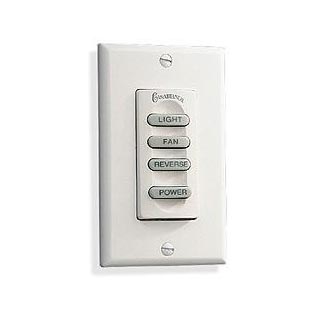
Casablanca Inteli-Touch Diagnostics
The fan and light turn on and off, but only at high settings.
Review the operation instructions for fan and light listed below
Light Operation: With the light in the off position press and hold the light button (do not let go). The lights should start at a dim setting and gradually get brighter and brighter. When they get to a setting you desire let go of the light button. To reduce the brightness of the light you must first turn the light off, and then press the light button and hold it in as described above. If the light is off, and you press the light button quickly to turn it on, the light will go back to the previous setting. So if you last had the light on the high setting, it will go back to the high setting, if you had the light at a lower setting it will turn back on to the lower setting. Keep in mind you can increase the light intensity at any time by pressing and holding the light button, but to decrease the light intensity, you must first turn the light off, and start over by pressing and holding in the light button.
Fan Operation: With the fan in the off position, press and hold the fan button (do not let go). The fan should start at a slower speed and get faster and faster. When the fan is at the speed you desire, let go of the fan button. To slow down the fan speed you must first turn the fan speeds off by pressing and releasing the fan button. If the fan speeds are off, and you press the fan button quickly to turn it on, the fan will go back to the previous setting. So if you last had the fan at the highest setting, it will go back to the high setting, if you had the fan at a lower setting it will turn back on to the lower setting. Keep in mind you can increase the fan speed at any time by pressing and holding the fan button, but to decrease the fan speed you must first turn the fan off, and start over by pressing and holding in the fan button.
My fan turns on and off and changes speeds, but my light either does not turn on or can’t be turned off.
TWO WIRE SWITCH
1.Turn off Power
2.Remove Switch from wall and swap the positions of the two wires.
3.Turn Power on.
4.The light button will now control the fan, and the fan button will control the light.
If the light now works fine, but now the fan does not work, the switch is at fault and needs to be replaced.
If the light still does not work via the fan button, then the circuit board in the fan is at fault.
THREE WIRE SWITCH
1.Turn off Power
2.Remove Switch from wall Swap the positions of the two black/white striped wires with each other
3.Turn Power on.
4.The light button will now control the fan, and the fan button will control the light.
If the light now works fine, but now the fan does not work, the switch is at fault and needs to be replaced.
If the light still does not work via the fan button, then the circuit board in the fan is at fault.
Note: In some rare cases a light which is on all the time can indicated a bare neutral wire (white wire) on the light wiring or light connection. Newer circuit boards by Casablanca supply constant power to the circuit boards and control the light by regulating electricity on the neutral wire. If the neutral wire is pinched light will stay on full brightness.
My light works just fine and dims but my fan does not work at all.
Inspect the rubber flywheel on the fan. This is the part the blades attach to. Check to see if the spokes of the wheel are torn, or if the flywheel is binding preventing the blades from spinning. If the motor is spinning but the blades and flywheel do not move, you will need to purchase a new flywheel.
TWO WIRE SWITCH
1.Turn off Power
2.Remove Switch from wall and swap the positions of the two wires.
3.Turn Power on.
4.The light button will now control the fan, and the fan button will control the light.
If the fan now works fine, but now the light does not work, the switch is at fault and needs to be replaced.
If the fan still does not work via the light button, then the circuit board in the fan is at fault.
THREE WIRE SWITCH
1.Turn off Power
2.Remove Switch from wall Swap the positions of the two black/white striped wires with each other
3.Turn Power on.
4.The light button will now control the fan, and the fan button will control the light.
If the fan now works fine, but now the light does not work, the switch is at fault and needs to be replaced.
If the fan still does not work via the light button, then the circuit board in the fan is at fault.
My light works just fine but the fan runs only at highest speed.
From the fan off position press and hold the fan button to hear different tones, and are letting go of the button at the desired speed. If you hear tones at every speed, but the fan completely stops every time you let go at speeds 1-5, but stays running if set to the highest speed, often replacing just the orange BFR on the motor will solve the issue. Be aware however newer BFR’s sold around 1988 and newer have a ribbon cable connection, but older BFR’s prior to this point used wires which went into a wiring harness. Only ribbon style BFR’s are now available. If you have the older wire style of BFR it means you will need to purchase a complete upgrade kit including Circuit Board, BFR, Conversion Wiring Harness, and also a new wall control switch if you are still using the older 3 button design switches.
Neither my fan or light work correctly.
1. If you have another InteliTouch fan in your home you can take the switch from the fan which you know is working correctly and try it on the fan which is not working correctly. If doing this makes the fan or light work you will only need to purchase a new switch.
2. If you have access to an OHM meter turn power off and remove the switch from the wall wiring and put the two OHM meter leads across two wires of the switch. Push in the power button switch. The meter should indicate a closed circuit (current flows through switch causing meter needle/gauge to change). Turn the switch off. The meter should indicate an open circuit (current does not flow through the switch). If you turn the switch on and off and the OHM meter never changes with the position of the on/off switch no power is getting though the switch. This means you will need to purchase a new switch. If the new switch does not solve the problem then you also may have a bad circuit board in addition to the bad switch. When pressing the fan and light button you should notice a slight deflection in the ohm meter readings while the buttons are pushed in. Normally pushing one button in causes a greater deflection in the readings. If you have no deflection chances are the switch is bad.
3. Purchase a new wall control switch and install it. If this cures the problem you had a bad switch. If the problem remains the same then you will also need to purchase a new circuit board. It is possible for both the switch and circuit board to be bad at the same time so do not return the switch until after you have installed the new circuit board.
Intelitouch Notes:
A. The purchase of a new circuit board will require the use of the newer four-button W32 control switch. If you already have the four button W32 then you do not need to purchase a new switch. However, if you have the older three button switches you will need to purchase a W32 with the circuit board for correct operation.
B. The newer four-button W32 switch can be used with both older and newer circuit boards. These means it is a direct replacement for the three button controls and will work with any age of Casablanca InteliTouch board.
C. Do not exceed the maximum wattage rating of your light sockets and do not attach a light which exceeds 340 total watts.
D. Most problems with the printed circuit boards in the fan and in the switch are caused by a power surge in the power line, or a short in the light kit due to excessive wattage bulbs being used. You should inspect your fan or light kit for any possible shorts prior to installing a new circuit board.
E. Never change the light bulbs with the lights on. Doing so can cause possible circuit board failure. Turn the main power switch off first.
F. All Casablanca Intelitouch ceiling fans made since 1986 have come with a manufacturers 1 year warranty on the Intelitouch parts. The warranty on the actual fan motor during these years has varied from a 10 year warranty to a lifetime warranty.
G. Fans made prior to 1986 used a plastic casing around the circuit board and also had a smaller circuit board above the light. These parts are no longer made. If you have this type of fan you will need to purchased the P-RELKIT Intellitouch upgrade kit from Fan Man Lighting
Share This :
Search
Recent Post
The Difference Between 3 Blade and Multi-Blade
July 30, 2025
How To Tell Which Direction To Run Your Ceiling Fan
December 22, 2022
Finding Model and Serial Number for Casablanca Ceiling Fans
December 14, 2022

4 Responses
I have 4 Casablanca fans (2004 vintage). Recently the switches failed, possible voltage spike? Is there a single after market switch replacement for the W-32 (3 wires being used), that could control all 4 fans simultaneously. I am an electrician and want to understand the principle of operation better. Is there a microprocessor onboard the fan canopy that regulates the wall switch commands? I do not have lights attached. I only need speeds and FWD/REV control. Could you email me your phone so we might talk?
Hello Dale. There isn’t a direct replacement for Casablanca’s Inteli-Touch controls. You will need to convert the receiver in the fan to our IT4 system which will allow the choice of our transmitters. Our IT4 system will control the fan with 3 speeds forward/reverse You can call us with questions anytime during business hours 952-683-9450 tech line or 952-898-2754 main line during business hours.
Can a W-32 controller be used in place of a
W-31 controller? I have a 2 wire system. The light and fan just stopped working???
Hello Don,
The W-32 will work as a direct replacement for your W-31. When an Inteli-Touch fan stops working, It’s most likely the circuit board that has failed. We offer an aftermarket workaround using another company’s control system. Give us a call with your model and serial number located on your fan and we can help determine which conversion is needed.
Regards,
The Fan Man Lighting Team
952-683-9450 or 952-898-2754